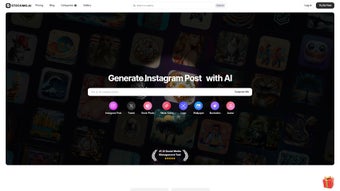

Download Text To Book Cover – AI‑Powered Book Cover Designer, Fast & Free Trial
Overview: Why Text To Book Cover Is Changing the Publishing Landscape
In a market where first impressions decide sales, a compelling book cover can be the difference between a bestseller and a shelf‑dust collector. Text To Book Cover is a web‑based, subscription‑driven application that harnesses artificial intelligence to streamline the entire cover‑creation workflow. Built for authors, indie publishers, and marketing teams, the platform eliminates the need for costly graphic designers while still delivering professional‑grade results.
The core promise of the tool is speed without sacrificing creativity. By entering a simple text prompt—such as the book’s title, subtitle, and genre—the AI instantly generates multiple layout concepts, each populated with high‑resolution stock images from an extensive library. Users can then fine‑tune typography, color palettes, and image placement through an intuitive drag‑and‑drop editor. Because everything runs in the browser, there’s no heavy software to install, and the latest AI models are updated automatically, guaranteeing the most current design trends.
Beyond the design engine, Text To Book Cover offers a thriving community hub. A regularly updated blog shares design tips, case studies, and industry news, while active Instagram and LinkedIn channels keep users inspired and connected. Pricing tiers are displayed on a dedicated page, providing options ranging from a free trial to premium plans with unlimited downloads and priority support. Overall, the service blends efficiency, affordability, and community, making it an essential addition to any author’s toolkit.
From a SEO perspective, the platform is optimized for fast loading, secure HTTPS connections, and mobile‑responsive layouts, which helps authors who promote their books on social media and need quick visual assets. The combination of AI speed, a massive royalty‑free image library, and cross‑platform accessibility makes Text To Book Cover a strategic tool for anyone looking to improve discoverability and conversion rates in a crowded marketplace.
Key Features That Set Text To Book Cover Apart
- AI‑Generated Layouts: Input title, genre, and keywords; receive dozens of ready‑to‑customize cover concepts in seconds.
- Vast Stock Image Library: Access thousands of royalty‑free photos, illustrations, and textures curated for book publishing.
- Drag‑and‑Drop Editor: Intuitive interface for adjusting fonts, colors, spacing, and image layers without any design background.
- Real‑Time Preview: See how the cover looks on e‑readers, paperback mockups, and even marketing banners instantly.
- Version History & Export Options: Save multiple revisions and export in high‑resolution PNG, JPEG, or PDF formats ready for print or digital distribution.
- Collaborative Workspace: Invite co‑authors or editors to comment and edit designs directly within the platform.
- Regular AI Model Updates: Stay on top of visual trends as the underlying algorithms are refreshed monthly.
- Educational Blog & Resource Center: Learn design fundamentals, SEO‑friendly title crafting, and market‑specific cover strategies.
- Social Integration: Share drafts on Instagram or LinkedIn with a single click to gather feedback from your audience.
- Secure Cloud Storage: All projects are encrypted and stored on GDPR‑compliant servers, ensuring data privacy.
These features combine to create a complete ecosystem for book cover creation. The AI engine reduces the brainstorming phase, while the editor provides the fine‑tuning tools that professional designers rely on. Because the platform is cloud‑based, users can hop between Windows, macOS, or even mobile browsers without missing a beat. The collaborative workspace also addresses the common pain point of version control, allowing teams to keep every stakeholder in the loop.
Another noteworthy aspect is the built‑in analytics dashboard, which tracks how often each cover concept is viewed, shared, or downloaded. This data helps authors understand which visual direction resonates most with their target audience, enabling data‑driven decisions before a book even hits the market. The feature set is purpose‑built for speed, quality, and scalability—qualities that are essential for authors who need to launch multiple titles per year while maintaining a consistent brand identity.
Installation & Usage Guide – Getting Started on Any Device
Step‑by‑Step Installation (Zero‑Download Required)
Since Text To Book Cover operates entirely online, there is no traditional installation process. Users simply navigate to the official website, click the “Start Free Trial” button, and create an account using an email address or social login (Google, LinkedIn). After email verification, the dashboard appears, ready for the first design project.
Creating Your First Cover
- Enter Your Book Details: Type the title, subtitle, author name, and select the genre from a dropdown. Optional keywords help the AI narrow down relevant imagery.
- Choose a Design Style: The AI suggests three primary style families—minimalist, illustrated, and photographic. Select one to see ten variations instantly.
- Customize the Layout: Use the drag‑and‑drop canvas to replace images, adjust typography, and experiment with color schemes. The editor includes preset font pairings optimized for readability.
- Preview & Export: Toggle between e‑book, paperback, and marketing mockups. When satisfied, click “Export” to download a print‑ready PDF or a web‑optimized PNG.
- Gather Feedback: Use the built‑in comment system or share a public link on social media. Real‑time collaboration lets teammates approve or suggest changes without leaving the platform.
Compatibility Across Platforms
Because the application runs in modern browsers, it is fully compatible with Windows 10/11, macOS 12+, Chrome, Firefox, Safari, and Edge. Mobile users on Android 8+ or iOS 13+ can also access the editor, though the full feature set is best experienced on a desktop or laptop with a larger screen.
Security is handled through HTTPS encryption and two‑factor authentication (2FA) for premium accounts. All uploaded assets and generated designs are stored securely in the cloud, ensuring that you can return to a project from any device without losing progress. Updates to the AI model, UI enhancements, and new stock image additions are rolled out automatically, meaning you never need to download patches or worry about version incompatibility.
Overall, the installation and usage experience is deliberately frictionless: no software downloads, no complex licensing, and a clear onboarding flow that gets authors from concept to cover in under ten minutes. The platform also offers a comprehensive help centre, video tutorials, and live chat support for premium members, ensuring that any question is answered promptly.
Pros & Cons, FAQ, and Final Verdict – Should You Download Text To Book Cover?
Pros
- Lightning‑fast AI generation cuts design time dramatically.
- Extensive royalty‑free image library eliminates extra licensing costs.
- Web‑based platform works on any OS—no installation headaches.
- Collaborative tools simplify teamwork and feedback loops.
- Regular AI updates keep designs on‑trend without manual effort.
- Built‑in analytics help authors choose the most marketable cover.
- Secure cloud storage and GDPR compliance protect user data.
Cons
- Full feature set requires a paid subscription; the free tier is limited to a few exports.
- Advanced typographic control is less granular than dedicated desktop software like Adobe InDesign.
- Internet connection is mandatory; offline work is not possible.
- While the image library is large, niche genres may need custom uploads.
- Export options are robust, but vector‑based editing is not supported.
Frequently Asked Questions
Is there a free trial available?
Yes. Text To Book Cover offers a 7‑day free trial that lets you create and export up to three covers. No credit card is required to start the trial.
Can I use the generated covers for commercial publishing?
Absolutely. All images and design elements provided within the platform are royalty‑free for commercial use, provided you maintain an active subscription.
What file formats are supported for export?
You can export covers as high‑resolution PNG, JPEG, or print‑ready PDF. The PDF includes bleed settings for professional printing.
Does the platform integrate with popular publishing platforms?
While there is no direct API integration, exported files can be uploaded to services like Amazon Kindle Direct Publishing, Draft2Digital, and IngramSpark without any compatibility issues.
How secure is my data and my designs?
All data transmission is encrypted via HTTPS, and stored assets are protected on GDPR‑compliant servers. Premium users can enable two‑factor authentication for added security.
Can I collaborate with team members in real time?
Yes. The collaborative workspace lets you invite co‑authors, editors, or designers to comment, suggest edits, and even make changes directly within the project canvas.
Final Review
Text To Book Cover delivers on its promise of rapid, AI‑driven cover creation while keeping the workflow simple enough for non‑designers. The combination of a massive stock library, real‑time previews, and collaborative tools makes it a compelling choice for indie authors who need professional results on a budget. Although the free tier is limited and offline work isn’t possible, the value provided by the subscription—especially for authors publishing multiple titles—outweighs these drawbacks.
Conclusion & Call to Action
If you’re ready to accelerate your publishing timeline and present a polished, market‑ready cover, download Text To Book Cover today. Start with the free trial, explore the AI‑generated concepts, and see how quickly a professional design can be produced without hiring a graphic artist. With continuous updates, secure cloud storage, and a supportive community, the tool positions itself as a long‑term ally for any author or publisher looking to stay ahead in a crowded marketplace. Click the button below to begin your free trial and transform your manuscript into a visual masterpiece.



.png)



